Learn · Game design

Building a 3D scene

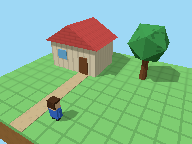
A 3D scene starts as a list of numbers and ends as a picture. Here is one little world, a house, a tree, and a hero, drawn one layer at a time, each step adding a single thing to the last.

The shape Points Every model starts as corners: points in space, three numbers each. Details
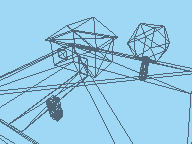
The shape Triangles Corners joined in threes: the triangles every 3D model is made of. Details
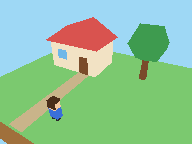
The surface Colours Each triangle filled with its colour, and no light: it looks flat again. Details
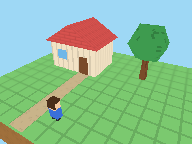
The surface Textures Small pictures wrapped over the triangles: planks, roof tiles, bark. Details
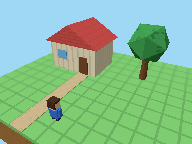
The light Light Faces turned toward the sun are bright, faces turned away are dark. Details
The light Shadows Where the sun can't reach, a shadow: now the scene sits on its ground. Details
Draw it up to

Turn it round

The same world, drawn live. Pick a step and drag the picture: the points and triangles show how little a low-poly world needs, and the light shows how much one sun does.

The 3D world needs JavaScript.

Drag to turn it round.
Draw it up to

The shape

What the artist models, once, before the game ever runs.

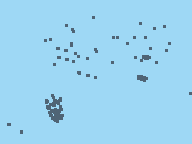
Points: Every model starts as corners: points in space, three numbers each.

Points

Also called vertices, corners

Before anything is drawn, a model is a list of corners, each one three numbers: how far across, up, and back it sits. A box needs only eight. On their own they're just dots, but they already hold the whole shape.

Stored as
Across, up, and back for every corner
Done by
An artist, in a 3D modelling program
Triangles: Corners joined in threes: the triangles every 3D model is made of.

Triangles

Also called wireframe, mesh, polygons

The corners are joined three at a time into triangles, because three points always lie on one flat surface. Every 3D model, however smooth it looks, is a mesh of them; low-poly art just uses few and lets you see them.

Stored as
Which three corners make each triangle
Done by
An artist, in a 3D modelling program

The surface

What the artist paints over the shape, also made once and stored with the game.

Colours: Each triangle filled with its colour, and no light: it looks flat again.

Colours

Also called base colour, unlit

Fill the triangles with colour and the scene is recognisable, but with no light every face of a block is the same shade, so it looks like flat cut-outs. Light is what makes 3D look 3D.

Stored as
A colour for each model, or each corner
Done by
An artist
Textures: Small pictures wrapped over the triangles: planks, roof tiles, bark.

Textures

Also called texture maps, materials

A texture is a small picture stretched over the triangles, so a flat wall can show planks without modelling each one. Pixel-art 3D games keep textures tiny and unsmoothed, so their pixels stay square, like these.

Stored as
Small pictures, and where each corner sits on them
Done by
An artist paints them; the graphics card wraps them on

The light

What the game works out for itself every frame, from where the lights and the camera are.

Light: Faces turned toward the sun are bright, faces turned away are dark.

Light

Also called shading, lighting

For every face, the game works out how squarely it faces each light, and brightens or darkens it to match. The blocks have tops and sides again. It's worked out fresh every frame, so lights and models can move.

Stored as
Each light's direction, colour, and strength
Done by
The graphics card, every frame
Shadows: Where the sun can't reach, a shadow: now the scene sits on its ground.

Shadows

Also called shadow maps

To find shadows, the game first draws the scene from the light's side, keeping only how far away each thing is: a shadow map. Then any point farther from the light than the map says is in shadow. It's one of the costlier steps, which is why shadow quality is a common setting.

Stored as
A depth picture taken from the light
Done by
The graphics card, every frame

Made once, or every frame

The first four steps are art: made once, stored in the game's files, and loaded when you play. The last two are worked out by the graphics card for every frame, often 60 times a second or more, which is why so many graphics settings are about light and shadow.

Many games save some of that work by baking: working out light and shadow once, ahead of time, and painting it into the textures. It's fast, but baked shadows can't move.

Side by side

Step Stored as Done by
Points Across, up, and back for every corner An artist, in a 3D modelling program
Triangles Which three corners make each triangle An artist, in a 3D modelling program
Colours A colour for each model, or each corner An artist
Textures Small pictures, and where each corner sits on them An artist paints them; the graphics card wraps them on
Light Each light's direction, colour, and strength The graphics card, every frame
Shadows A depth picture taken from the light The graphics card, every frame

More on 3D

Once the world is built, a camera films it: see where games put it in Cameras in 3D games, and what its lens does in Lenses and field of view.